Enconvert vs ConvertAPI
Most conversion API comparisons skip the part that actually matters: both services look identical until you're six weeks into production and either you run into a compliance requirement you didn't plan for, a format your vendor simply doesn't support, or a billing model that stops making sense at your volume.
Enconvert and ConvertAPI are the two closest competitors in this category. Both platforms bill per conversion, transforms URLs, HTML, and Office documents into PDFs. Both have MCP servers and they rely on headless Chrome rendering. The differences are real- compliance depth, format breadth, client-side integration options, file size limits, and where the pricing floor sits. However, none of them show up on a features checklist. They show up in edge cases.
The quick map of how each platform works
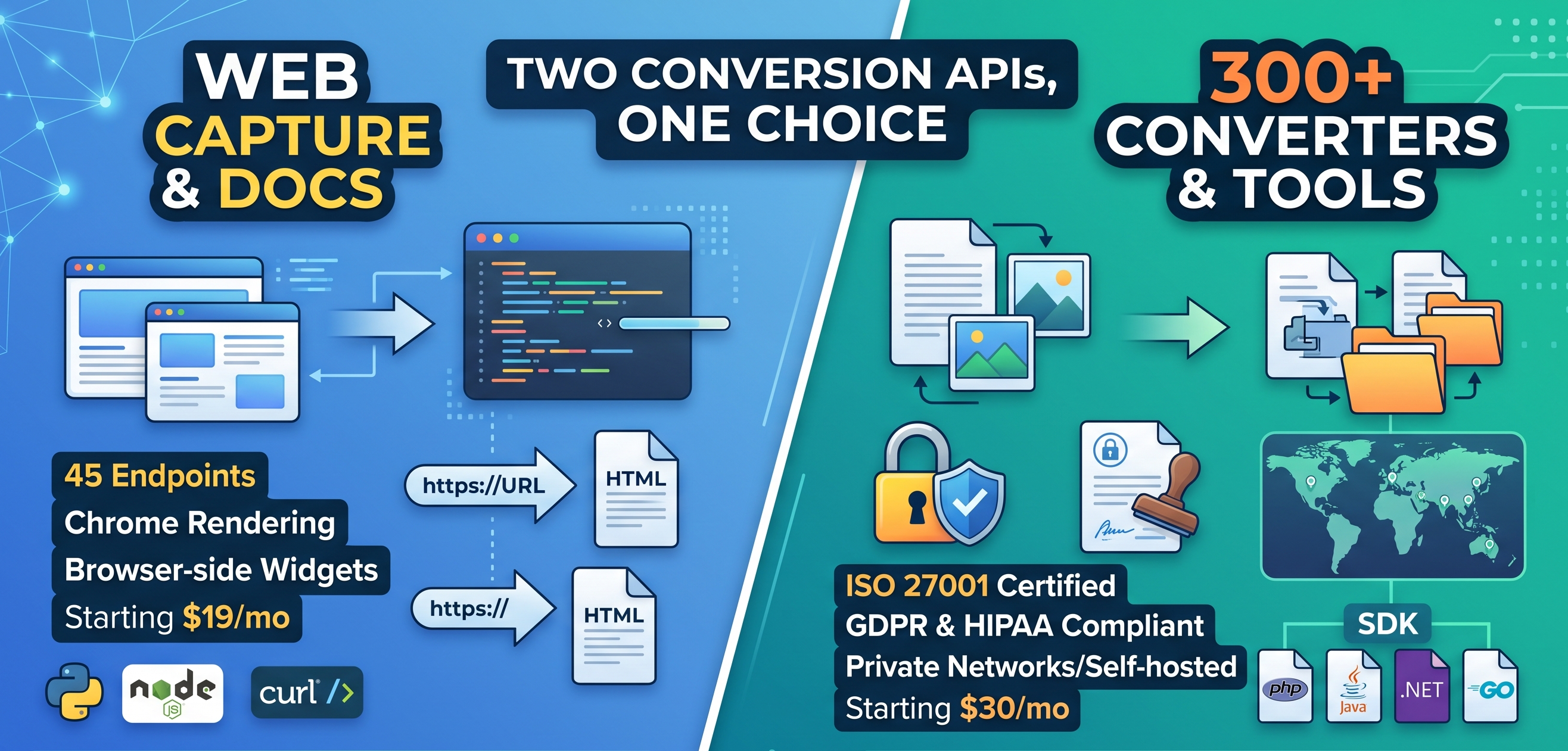
Enconvert is a conversion API with around 45 endpoints which includes web capture, document conversion, image conversion across all endpoints. The Starter plan will cost you $19 for 2,000 conversions ($9.50 per thousand). The Business will cost you $149 for 50,000 ($2.98 per thousand). Chrome-based rendering. It is synchronous by default, so the system simply sends a request and receives the converted file on the spot. Furthermore, it has domain-locked public API keys for browser-side use, and embeddable iframe widgets for WordPress and SaaS dashboards.
ConvertAPI is a conversion API with 300+ converters and tools covering a wider format surface- MS Office, PDF manipulation, image conversion, email conversion, document repair, watermarking, encryption, compression, accessibility compliance, and more. Billing unit is one conversion. You can test the free trial which offers 250 conversions with no credit card required. Paid plans are subscription-based with monthly conversion quota ranging from 12,000 on the smallest annual plan up to 180,000 on larger tiers. File size limits run from 200MB at the entry tier up to 1GB on higher plans. Compliance certifications include ISO 27001, GDPR, and HIPAA across paid plans, with signed NDA and DPA available from the entry monthly tier upward.
Enconvert: per conversion, broad surface, client-side friendly
Enconvert is the ideal choice for teams that need file and URL conversion without compliance overhead, or who need client-side integration that ConvertAPI doesn't offer.
The endpoint surface covers URL to PDF, HTML to PDF, URL to screenshot, document conversion across DOCX, XLSX, PPTX, ODT, Pages, Numbers, EPUB, HTML, Markdown, CSV, JSON, XML, YAML, and TOML. The endpoint surface can also convert images between JPEG, PNG, SVG, HEIC, and WebP. You can manage all of these with a single account, one API key, and one flat billing unit across every single format.
The URL to PDF and HTML to PDF endpoints support the options that matter the most in production- page size across A and B series plus Letter, Legal, Tabloid, and Ledger, custom dimensions in millimeters, portrait or landscape, configurable margins, header and footer templates with page number and total page count placeholders, and background graphics. Additionally, the system automatically handles cookie banners, lazy-loaded images, and sticky headers.
Two things that Enconvert has that ConvertAPI doesn't: domain-locked public keys that are safe for browser-side use, and embeddable iframe widgets that you can drop in any webpage or WordPress, without the need to build or maintain a backend. If tthe goal is to simply add file conversion to a SaaS dashboard or a public website without custom backend, these features are the game-changers.
To be straight about it: Encovert falls short on compliance compared to ConvertAPI. They don't have published ISO 27001, HIPAA, or GDPR certifications, also, no signed BBA. If the procurement team needs any of these, ConvertAPI is the clear choice.
Call the URL to PDF endpoint in cURL:
curl -X POST https://api.enconvert.com/v1/convert/url-to-pdf
  -H "X-API-Key: YOUR_API_KEY" \
  -H "Content-Type: application/json"
  -d '{"url": "https://example.com", "direct_download": true}'
Same in Python:
import requests

r= requests.post(
   "https://api.enconvert.com/v1/convert/url-to-pdf",
   headers= {"X-API-Key": "YOUR_API_KEY"},
   json= {"url": "https://example.com", "direct_download": true}
)
Enconvert MCP: five conversion tools for any MCP- compatible assistant
Enconvert's MCP server exposes file and URL conversions as native MCP tools for Claude Desktop, Claude Code, Cursor, Windsurf, and other MCP-compatible clients. It comes as an npm package- encovert-mcp -that executes as a local subprocess using npx. No self-hosted option is published yet.
Installing in Claude Code (macOS/ Linux):
claude mcp add enconvert -s user \
  -e ENCONVERT_API-KEY= sk_live_your_key \
  -- npx -y enconvert-mcp@latest
Claude Code (native Windows):
claude mcp add enconvert -s user \
  -e ENCONVERT_API_KEY= sk_live_your_key \
  -- cmd /c npx -y enconvert-mcp@latest
Available Tools:
Tool | What it does |
|---|---|
convert_url_to_pdf | Render any live web page as PDF |
convert_url_to_screenshot | Capture a full-page PNG screenshot of any URL |
convert_url_to_markdown | Extract clean markdown- ideal for RAG ingestion or summarization |
convert_document | Convert DOCX, XLSX, PPTX, ODT, Pages, Numbers, EPUB, HTML, Markdown, CSV, JSON, XML, YAML, TOML between formats |
convert_image | Convert between JPEG, PNG, SVG, HEIC, and Web |
ConvertAPI: 300+ converters, compliance certifications, deeper PDF toolset
CovertAPI is running longer that Enconvert and the massive feature set says it all. It offers 300+ converters and tools that handles everything: standard Office-to-PDF or HTML-to-PDF through PDF editing like watermarking, encryption, compression, accessibility compliance. It also cover email conversions, document repair, document comparison, and dynamic document generation. SDKs in PHP, Node.js, Python, Java, .NET, Ruby, Go, Swift, and CLI, with no-code integrations with Zapier and Make.
Compliance coverage is the headline differentiator. It is fully ISO 27001, GDPR, HIPAA certified. It offer signed NDAs and DPAs on all monthly plans, right from the entry tier. It also offer in-memory conversion so no files are stored on their servers, along with configurable data retention policies and AES-256 encryption both in transits and at rest. You can even choose regional data residency to prevent data from leaving a specific country. For organizations in regulated industries like healthcare, legal, or finance, ConvertAPI's compliance setup is easily the most complete one in this comparison.
ConvertAPI gives significantly more file size than Enconvert at similar pricing tiers. You get 200MB limit on the smallest annual plan, 300MB on the next tier, 500MB on monthly plans, and massive 1GB limit at the top tier. If the team processes massive files- high-resolution image-heavy reports, engineering CAD conversions, or bulk legal filings, that extra headroom is a major advantage.
Lets be straight about it: ConvertAPI's pricing is higher than Encovert for smaller teams. Their free trial gives you 250 one-time conversions rather than resetting it every month. And there are no domain-locked public keys or embeddable widgets. If the project requires client-side integration without building a backend, CovertAPI simply won't work.
ConvertAPI integration in Python using their SDKs:
pip install --upgrade convertapiimport convertapi
convertapi.api_credentials= 'api_token'
convertapi.convert('pdf', {
'File': '/path/to/my_file.doc'
}, from_format= 'docx').save_files('/path/to/dir')
ConvertAPI MCP: hosted and self-hosted, 300+ converts as agent tools
ConvertAPI's MCP server exposes document conversions as native MCP tools for Claude Desktop, Cline, and other MCP-compatible clients. It comes in two versions: one is hosted endpoint which uses OAuth for authentication, other is a self-hosted, it is open-source server that you can run locally.
The hosted version is the easiest way to get started- just point your MCP client at ConvertAPI's endpoint and authenticate. On the other hand, the self-hosted version is really good for teams that need local file access, private networks, custom deployments, or stricter control over credentials. It runs directly as a .NET project:
{
  "mcpServers": {
    "convertapi": {
      "command": "dotnet",
      "args": [
        "run",
        "--project",
        "C\\Path\\To\\CA.MCP.Local\\CA.MCP.Local.csproj",
        "--no-build"
      ],
      "env": {
        "CONVERTAPI_SECRET": "your_api_secret_here",
        "CONVERTAPI_BASE_URI": "https://v2.convertapi.com"
      }
    }
  }
}
Pricing, side by side
Service | Free Tier | Paid Entry | Billing unit | File size limit |
|---|---|---|---|---|
Enconvert | 100 conversions/mo- resets monthly | $19/mo- 2,000 conversions | Per conversion, flat across all endpoints | 5MB free/ 15MB Starter/ 50MB Pro/ 150MB Business |
ConvertAPI | 250 trial conversions- one time | $30/mo- 12,000 conversions | Per conversion, subscription-based | 200MB Developer/ 300MB Startup/ 500MB Growth/ 1GB Business |
The most important difference the table doesn't show: Enconvert's free tier resets every month. ConvertAPI's 250 trial conversions are one-time - once used, they're gone. If the team plans to test these tools with real workloads over several weeks, that difference matters.
Enconvert's per-thousand rate drops from $9.50 at Starter to $2.98 at Business. At that volume, it is the cheapest published per-unit rate for file and URL conversion in this comparison. On the other side, ConvertAPI's higher-tier plans give you much larger file-size limits and compliance certifications that Enconvert simply does not offer. If you operate in a regulated industry, those are just not features- they are strict compliance requirements, and ConvertAPI's pricing directly reflects that.
What each service can actually do
Capability | Enconvert | ConvertAPI |
|---|---|---|
URL to PDF | Yes | Yes |
URL to screenshot | Yes | Yes |
HTML to PDF | Yes | Yes |
DOCX/ XLSX/ PPTX/ to PDF | Yes | Yes |
ODT/ ODS/ ODP to PDF | Yes | Yes |
Pages/ Numbers/ Keynote to PDF | Yes | Yes |
Image format conversion | Yes | Yes |
JSON<-> XML/ CSV/ YAML/ TOML | Yes | Yes |
PDF manipulation (watermark, encrypt, compress, redact) | No | Yes |
Email conversion | No | Yes |
Document repair and comparison | No | Yes |
Dynamic document generation | No | Yes |
Accessibility compliance for PDFs | No | Yes |
OCR | Yes | Yes |
Domain-locked public API keys (browser side) | Yes | No |
Embeddable iframe widgets | Yes | No |
MCP server- hosted | Yes | Yes |
MCP server- self-hosted | No | Yes |
SDKs | Node.js | PHP, Node.js, Python, Java, .NET, Ruby, Go, Swift, CLI |
No-code integration (Zapier, Make) | No | Yes |
ISO 27001 certified | No | Yes |
GDPR complaint | No | Yes |
HIPAA complaint | No | Yes |
Signed NDA/ DPA | No | Yes- entry monthly tier and above |
In-memory conversion (no server storage) | No | Yes |
Regional data residency | No | Yes |
Max file size | 150MB (Business) | Up to 1GB |
The capabilities split has a clear pattern. For standard conversion jobs- like HTML to PDF, Office to PDF, image transformations, or data format swaps- it is a total tie. Where they differ is in their specialities. ConvertAPI is a choice if you need to do PDF manipulation, strict compliance certifications, a wider variety of file formats, and extensive SDK coverage. Enconvert, on the other hand, wins when it comes to client-side integration, ready-to-use embeddable widgets, and a free tier that resets every month.
Picking by the workload
Small team, standard conversion jobs, no compliance requirements: Enconvert. $19 entry point, monthly free tier, flat billing. The playground runs without an account.
Regulated industry- healthcare, legal, finance- where HIPAA or a signed BAA is a procurement requirement: ConvertAPI. It has certifications like ISO 270001, GDPR, and HIPAA. Signed NDA and DPA available. In-memory conversion and regional data residency for stricter environment.
Agent or SaaS product needing client-side conversion without a backend: Enconvert. Domain-locked public keys and embeddable widgets aren't available on ConvertAPI.
Workload includes PDF manipulation- watermarking, encryption, redaction, accessibility compliance- beyond just converting to PDF: ConvertAPI. Enconvert converts to PDF. Convert API also works on PDFs after that exist.
MCP in a private network or air-gapped environment: ConvertAPI. The self-hosted MCP option covers deployment where outbound npm installs or cloud-hosted MCP endpoints aren't permitted.
No-code team using Zapier or Make: ConvertAPI. Native Zapier and Make integrations aren't available on Enconvert.
High-volume file conversion past 50,000 conversions a month: Enconvert. $2.98 per thousand at the Business tier is the cheapest published per-unit rate for file and URL conversion in this comparison at that volume.
FAQ
Both bill per conversion. Which is cheaper?
The only honest answer is: it depends on the volume tier and what the compliance requirements are. Enconvert publishes explicit per-thousand rates- $9.50 at Starter down to $2.98 at Business- which makes the math straightforward. ConvertAPI doesn't publish per-plan dollar amounts in search-accessible pages, so the comparison requires checking their pricing page directly. What's verifiable: Enconvert's free tier resets monthly at 100 conversions. ConvertAPI's 250 trial conversions are one-time.
Does ConvertAPI have a monthly-reset free tier?
No. The 250 free conversions are a one-time trial. Once used, a paid plan is required. Enconvert's free tier is 100 conversions a month that reset every month- small, but ongoing.
Which MCP server works in a private network?
ConvertAPI's self-hosted MCP runs as a local .NET project with no outbound dependency on a hosted MCP endpoint. Enconvert's MCP runs via npx- it requires internet access to the npm registry and the Enconvert API. For air-gapped or private-network deployments, ConvertAPI's self-hosted option is the one that works.
Can Enconvert watermark or encrypt a PDF after conversion?
No. Enconvert converts file to PDF. It doesn't change PDFs after they're made. If you need to add watermark, encrypt, redaction, or accessibility compliance on existing PDFs, ConvertAPI has a dedicated PDF toolkit.
Which one integrates with Zapier?
ConvertAPI has native Zapier and Make integrations. Enconvert doesn't publish Zapier or Make support. If the workflow lives in a no-code platform, ConvertAPI is the practical choice.
Is HIPAA compliance available on ConvertAPI entry plan?
ConvertAPI's compliance certifications- ISO 27001, GDPR, HIPAA- apply across the platform. Signed NDA and DPA are available from the entry monthly tier upward. Confirm the specific terms with their team before using for regulated data.
Starting points
If the job is standard file and URL conversion with no compliance overhead, the Enconvert playground runs without an account. You can paste a real URL or upload a file, make sure that the output looks the way to want it to. When you are ready, you can move to the $19 Starter plan. The Starter plan has 14-day free trial, there is a tier that resets every month. You do not need credit card.
If the workload touches regulated data, needs a signed BAA, requires deeper PDF manipulation, or runs in a private network where a self-hosted MCP matters, start with ConvertAPI's 250-conversion free trial- no card required- and confirms current plan pricing directly on their pricing page.
The two tools overlap significantly on standard jobs. The decision depends on what you need to comply, PDF manipulation depth, client-side integration needs, and where the pricing floor lands for your specific volume. Run both trials on a real workload before committing to either.